The plugin contains the implementation of data sources datasources operating on the RESTful API.Described data sources allow for read and transfer data between the PlusWorkflow system and an external API using the HTTP protocol methods (GET, POST, etc.). | Info |
|---|
It is also possible to communicate with the PWFL system's internal API. In this case, use "localhost" in the URL |
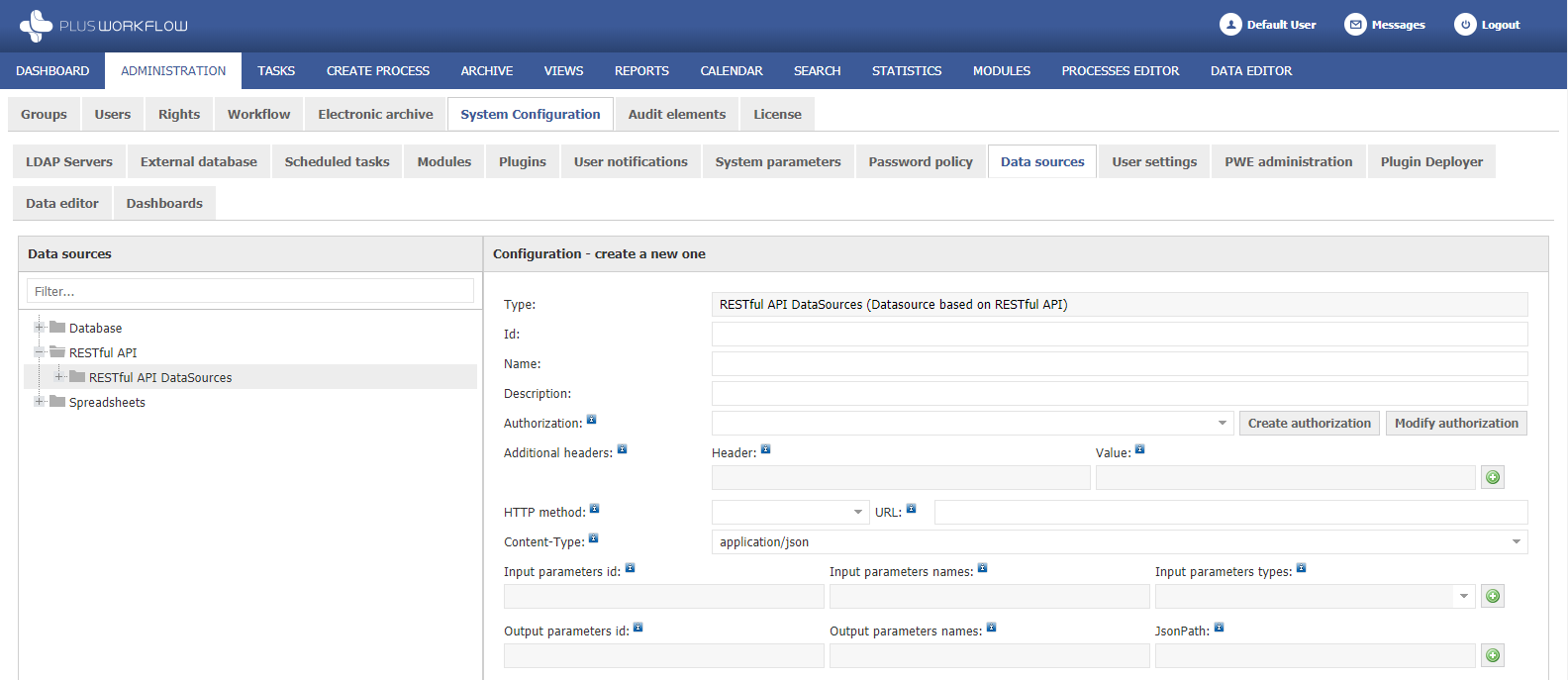
Configuration description: | | |
|---|
| Autoryzacja | Schemat autoryzacji żądania. Jeśli żądany endpoint nie wymaga autoryzacji pole należy zostawić puste. Opis definiowania szablonów autoryzacji znajduje się TUTAJ. | Opcjonalny | Dodatkowe nagłówki | Parametr pozwala na dodanie dodatkowych nagłówków do żądania. Parametr można wykorzystać np. do wymuszenia odpowiedzi z API w formacie JSON. W takim wypadku należy dodać wiersz w opisywanym parametrze i w polu "Nagłówek" podać wartość "Accept", natomiast w polu "Wartość" podać "application/json".
 Image Removed Image Removed
Poprawnie skonfigurowane API na żądanie z powyższym nagłówkiem powinno zwrócić dane w formacie JSON lub odpowiedzieć błędem w przypadku, gdy na to żądanie nie można odpowiedzieć w formacie JSON.Opcjonalny | Metoda HTTP | Lista metod protokołu HTTP. Dostępne metody | | |
|---|
| Authorization | Request authorization scheme. If the requested endpoint does not require authorization, leave the field blank. Description of defining authorization templates is HERE. | Optional | | Additional headers | The parameter allows adding additional headers to the request. The parameter can be used, for example, to force a response from the API in JSON format. In this case, add a row in the described parameter and enter "Accept" in the "Header" field, and "application/json" in the "Value" field.
Image Added
A properly configured API should return data in JSON format on request with the above header or reply with an error in case this request cannot be answered in JSON format. | Optional | | HTTP method | List of HTTP protocol methods. Available methods: GET, HEAD, POST, PUT, DELETE, PATCH. Należy wybrać wymaganą metodę żądania zgodnie z dokumentacją API. | WymaganyChoose the required request method according to the API documentation. | Required | | URLAdres URL endpointu, do którego wysłane zostanie żądanie. W przypadku wywołania akcję z API tego samego systemu PlusWorkflow, w którym skonfigurowane jest źródło adres | URL musi zawierać domenę Endpoint URL to which the request will be sent. If you call an action from the API of the same PlusWorkflow system in which the datasource is configured, the URL must contain the domain "localhost". | WymaganyRequired | | Content-Type | Parametr pozwala na zdefiniowanie formatu danych przekazywanych w ciele żądania. Parametr jest stosowany tylko, gdy wśród parametrów wejściowych znajdują się parametry typu "Parametr Body". W pozostałych przypadkach wartość tego parametru nie ma znaczenia. | Wymagany | Parametry wejściowe | | | |
|---|
Określa id parametrów wejściowych. W przypadku parametru typu "Paramter URL" należy podstawić zdefiniowane id do adresu URL żądania w formacie {id} np. The parameter allows defining the format of the data transferred in the body of the request. The parameter is used only if the "Parameters Body" type parameters are among the input parameters. In other cases the value of this parameter does not matter. | Required | | Input parameters | | | |
|---|
Specifies the id of the input parameters. | Określa wyświetlaną nazwę parametrów wejściowych | Parametr URL - parametr zostanie przekazany w adresie URL Parametr Body - parametr zostanie przekazany ciele żądania | Warning |
|---|
Parametrów typu "Parametr Body" nie należy dodawać do żądań typu Specifies the display name of the input parameters | URL param - the parameter will be passed in the URL Body param - the parameter will be passed in the request body | Warning |
|---|
Parameters of type "Body param" should not be added to requests of type "GET"! |
|
| OpcjonalnyOptional | | Parametry wyjściowe | | | Nazwy parametrów wyjściowychOutput parameters | | |
|---|
| Określa id parametrów wyjściowych używane w mappingu | Określa wyświetlaną nazwę parametrów wyjściowych | Ścieżka (podobna do XPath) służąca do wyodrębnienia danych z wynikowego JSON-a. Dokumentacja korzystania z Specifies the id of the output parameters used in mapping | Specifies the display name of the output parameters | A path (similar to XPath) used to extract data from the resulting JSON. Documentation for using JsonPath - https://github.com/json-path/JsonPath
 |
| OpcjonalnyOptional |
|---|
Przykłady konfiguracjiConfiguration samples: | | | Opis | | | |
|---|
 |  | | Code Block |
|---|
| {
success: true,
message: "user was created"
} |
| Źródło dodaje użytkownika do API example.com i w odpowiedzi wyświetla informację o sukcesie operacji oraz wiadomość z serwera. | | | | Opis| The source adds the user to the example.com API and responds with information about the success of the operation and a message from the server. |
| | | |
|---|
 |  | | Code Block |
|---|
| {
data: [
{
...,
userName: "admin",
...
},
{
...,
userName: "administrator",
...
}
],
total: 2
} |
| Źródło zwraca listę nazw użytkowników systemu PlusWorkflow, zawierających wartość przekazaną w parametrze "filter" oraz liczbę wszystkich zwróconych wyników przy każdej zwróconej nazwie użytkownikaThe datasource returns a list of PlusWorkflow system user names, containing the value passed in the "filter" parameter and the number of all results returned for each returned username. (Wywołanieexecuted dla with following query param: filter="admin") |
|