Versions Compared

Key

  • This line was added.
  • This line was removed.
  • Formatting was changed.

Polish

  ← Powrót do listy dostępnych akcji

Info

Jeśli masz problem ze zrozumieniem jak działa akcja, sprawdź opisy: Akcja, Wykonanie warunkowe, Parametry komponentów

Panel
titlePodstawowe informacje

ID komponentu w PWFL: table-insert-records

ID komponentu na confluence:

Kategoria: TableStore

Umiejscowienie akcji: Przyciski, Przycisk tabeli

Dostępna od wersji: 1.0.

X

100

Panel
titleOpis

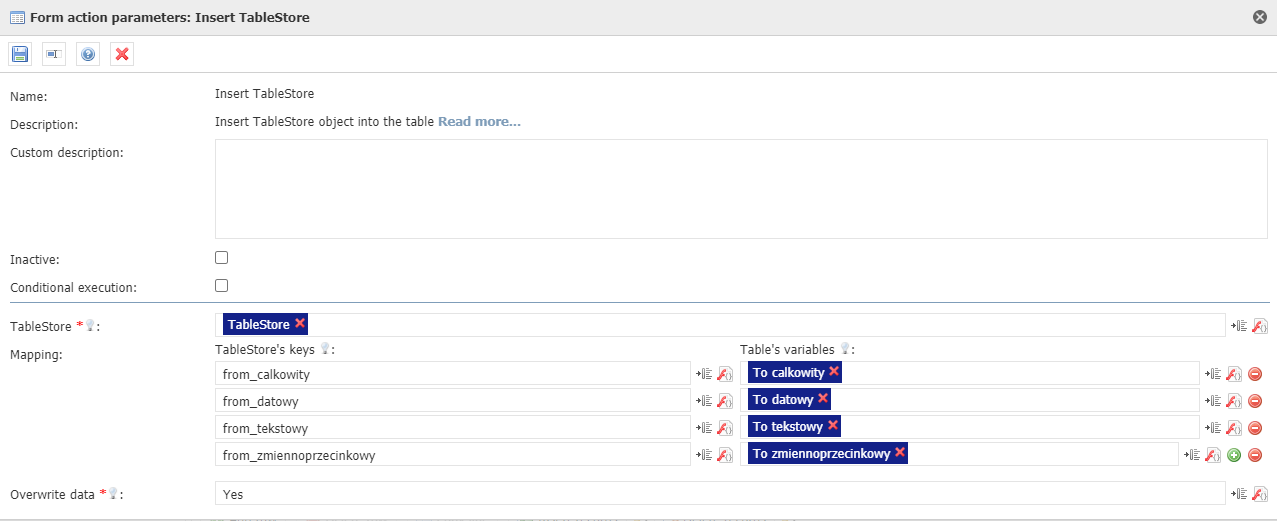
 Akcja wstawia rekordy obiektu TableStore do wskazanych zmiennych, tworzących tabelę. Więcej o obiekcie TableStore... 

Panel
titleWywołanie akcji
Umiejscowienie akcjiDziałanie parametru "Wykonanie warunkowe"Warunek wywołania akcji
PrzyciskUaktywnia akcjęNaciśnięcie przycisku
Przycisk tabeliUaktywnia akcjęNaciśnięcie przycisku
Panel
titleParametry konfiguracyjne
Nazwa parametruOd wersjiOpisTyp parametruWartość domyślnaRodzaj polaUwagi i ograniczenia
TableStore*1.0.X100TableStore, zawierający rekordy do wpisania do tabeliTekstowy Edytowalne 
[Mapping] Klucze TableStore'a*1.0.X100Klucze TableStore'a do zamapowania na zmienne tabeliTekstowy Tablicowy 
[Mapping] Zmienne tabeli*1.0.X100Zmienne tabeli do zamapowania na klucze TableStore'aZmienne Tablicowy 
Nadpisz dane*1.0.X100Decyduje czy dane znajdujące się w zmapowanych zmiennych mają zostać nadpisaneLogicznyNieLista rozwijanaMożliwe opcje: Tak, Nie

Parametr*- pole wymagane

Panel
titlePrzykładowa konfiguracja

Panel
titleChange log

 1.0.X100

  • Dodanie komponentu

Zadania związane z komponentem

Aktualne

Panel
titlePakiet z przykładowym formularzem wykorzystującym akcję

View file
nameTableStore 2021-01-29 12_46_02.zip
height250

Hide If
special@anonymous
JIRA
server192.168.1.52 JIRA
columnskey,summary,type,created,updated,due,assignee,reporter,priority,status,resolution
serverId2e6b42a8-62e1-3c71-bfe9-dbf183b33dc1
keyCUFCMP-738

Archiwalne


English

← Return to the list of available actions

Info

If you have trouble understanding how the action works, check the descriptions: Action, Conditional execution, Component parameters

Panel
titleBasic information

Category: TableStore

Action location: Button, Table button

Available from version: 1.0.

X

100

Panel
titleDescription

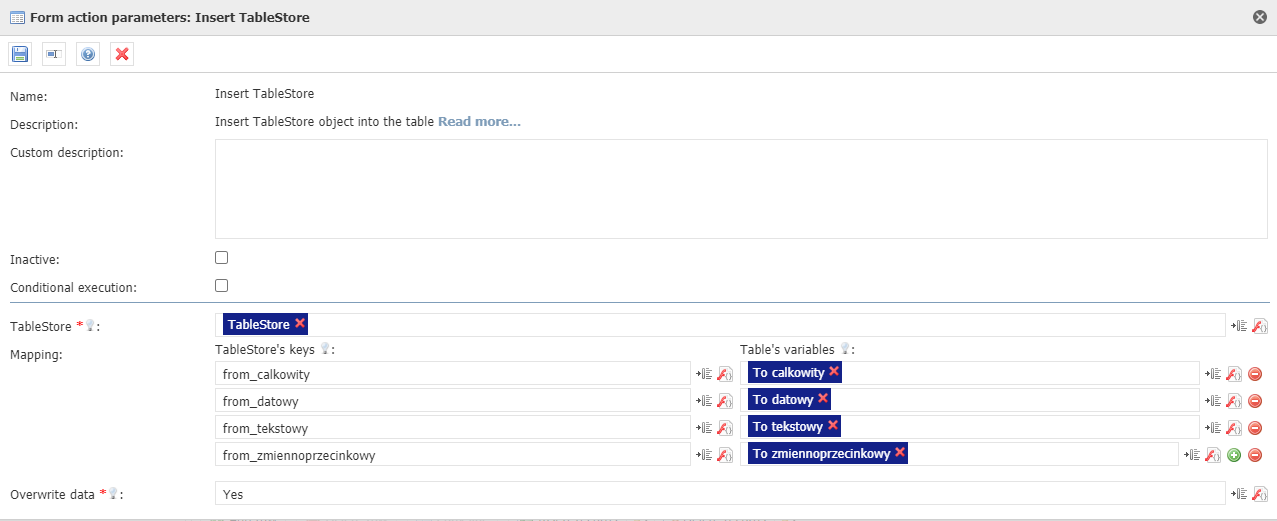
The action inserts the records of the TableStore object into the indicated variables that grouped in the table.

Panel
titleAction execution
Location of the actionOperation of the "Conditional execution" parameterCondition of calling the action
ButtonExecutes actionButton click
Table buttonExecutes actionButton click
Panel
titleConfiguration parameters
Name of the parameterFrom versionDescriptionParameter typeDefault valueField typeNotes and restrictions
TableStore*1.0.X100TableStore object to insert into the tableString Editable 
[Mapping] TableStore's keys*1.0.X100Keys from the TableStore to map onto variables from the tableString Array 
[Mapping] Table's variables*1.0.X100Variables from the table to map onto keys from the TableStoreVariable Array 
Overwrite data*1.0.X100Decides if data stored in mapped variables has to be overwrittenBooleanNoDrop-downAvailable options: Yes, No

Parameter*- required field

Panel
titleSample configuration

Panel
titleChange log

 1.0.X100

  • Adding component