Image Added
| Polish |
|---|
← Powrót do listy dostępnych akcji | Panel |
|---|
| title | Podstawowe informacje |
|---|
| Kategoria: TabelaDostępna od wersji: 1.0.2 |
| Panel |
|---|
| Akcja usuwa wszystkie wiersze z tabeli. Moment wywołania akcji uzależniony jest od umiejscowienia akcji na formularzu zadania - patrz sekcja "Wywołanie akcji" |
| Panel |
|---|
| | Info |
|---|
Pozostawienie pustego pola wykonania warunkowego jest jednoznaczne z ustawieniem go na "prawdę". |
| Umiejscowienie akcji | Działanie parametru "Wykonanie warunkowe" | Warunek wywołania akcji |
|---|
Tabela (od 1.0.20)
Zmienna | Wywołuje akcję | Parametr "Wykonanie warunkowe" zwróci "prawdę" | Przycisk formularza
|
|
|
...
| Przycisk tabeli | Wywołuje akcję | Naciśnięcie przycisku | | Formularz | Wywołuję akcję | Parametr "Wykonanie warunkowe" zwróci "prawdę" Zmiana wartości zmiennej |
|
| Panel |
|---|
| title | Parametry konfiguracyjne |
|---|
| | Nazwa parametru | Od wersji | Opis | Typ parametru | Wartość domyślna | Rodzaj pola | Uwagi i ograniczenia |
|---|
| Id tabeli* | 1.0.20 |
|
|
...
...
| zostać wyczyszczona (parametr niewidoczny w przypadku przeniesienia na tabelę oraz przycisk na tabeli). | Tekst | | Pole edytowalne | | | Zmienne* | 1.0.84 | Zmienna, której edycja wywoła akcję czyszczenia tabeli. | Tablica zmiennych | | Pole edytowalne | Parametr pojawia się tylko w przypadku umieszczenia akcji na formularzu. |
Parametr*- pole wymagane
|
| Panel |
|---|
| title | Przykładowa konfiguracja |
|---|
| Konfiguracja na tabeli  Image Modified Image Modified
Konfiguracja na przycisku 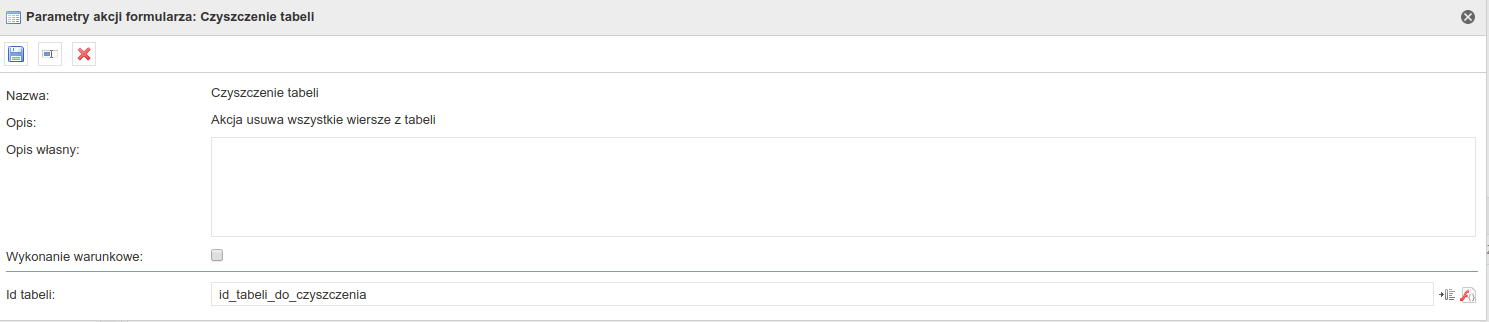 Image Modified Image Modified
|
|
...
| title | Przykład zastosowania |
|---|
Przykład warunku tabeli (uzupełnione pole):
#not(empty(item($Zaznaczony wiersz, $Wybrana zmienna))).
Przykład warunku tabeli (identyczna wartość w polu na formularzu i wybranym polu tabeli):
Konfiguracja na formularzu 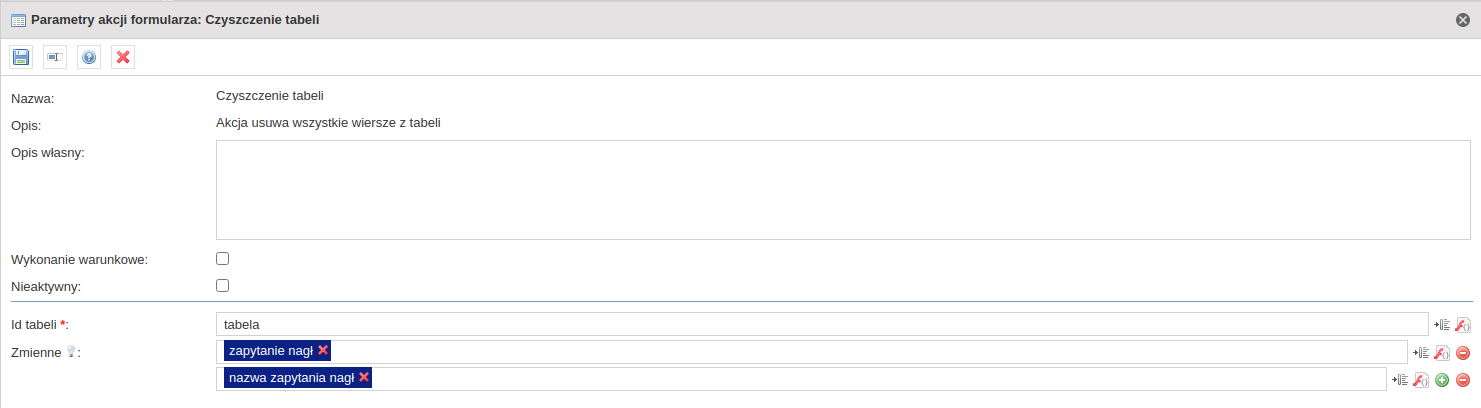 Image Added Image Added
|
|
...
- Dodanie możliwości umieszczenia komponentu pod przyciskiem
1.0.43 (obowiązująca dokumentacja) - Zmiana nazwy z "Wyczyszczenie tabeli" na "Czyszczenie tabeli"
1.0.84 - Dodanie możliwości umieszczenia komponentu pod przyciskiem tabeli, na formularzu oraz zmiennej
1.0.139 - Dodanie możliwości umieszczenia komponentu pod przyciskiem akceptacji
|
| Panel |
|---|
| title | Pakiet z przykładowym formularzem wykorzystującym akcję |
|---|
| | View file |
|---|
| name | Testy komponentów - akcje - [AKCJA] Wyczyszczenie tabeli 2019-10-14 10_22_45.zip |
|---|
| height | 250 |
|---|
|
|
| Hide If |
|---|
| Zadania związane z komponentemAktualneArchiwalne| JIRA |
|---|
| server | 192.168.1.52 JIRA |
|---|
| columns | key,summary,type,created,updated,due,assignee,reporter,priority,status,resolution |
|---|
| serverId | 2e6b42a8-62e1-3c71-bfe9-dbf183b33dc1 |
|---|
| key | CUFCMP-60 |
|---|
|
| JIRA |
|---|
| server | 192.168.1.52 JIRA |
|---|
| serverId | 2e6b42a8-62e1-3c71-bfe9-dbf183b33dc1 |
|---|
| key | CUFCMP-192 |
|---|
|
| JIRA |
|---|
| server | 192.168.1.52 JIRA |
|---|
| serverId | 2e6b42a8-62e1-3c71-bfe9-dbf183b33dc1 |
|---|
| key | CUFCMP-433 |
|---|
|
| JIRA |
|---|
| server | 192.168.1.52 JIRA |
|---|
| columns | key,summary,type,created,updated,due,assignee,reporter,priority,status,resolution |
|---|
| serverId | 2e6b42a8-62e1-3c71-bfe9-dbf183b33dc1 |
|---|
| key | CUFCMP-654 |
|---|
|
|
|
| English |
|---|
← Return to the list of available actions | Panel |
|---|
| Category: TableAvailable from version: 1.0.2 |
| Panel |
|---|
| The action clears all the rows from the table. The moment of triggering the action depends on the location of the action on the task form - see section "Action call-up" |
| Panel |
|---|
| | Info |
|---|
Leaving an empty conditional field is equal to setting it to "true". |
Action location | Conditional execution parameter action | Action call-up condition |
|---|
Table (from 1.0.20)
Variable | Call-up action | The "Conditional execution" parameter will return "true" | Button | Call-up action | Pressing the button | | Form | Call-up action | The "Conditional execution" parameter will return "true" Changing the value of a variable |
|
| Panel |
|---|
| title | Configuration parameters |
|---|
| Parameter name | From version | Description | Paremeter type | Default value | Field type | Comments and restrictions |
|---|
Table Id* | 1.0.20 | Id of the table to be cleared (parameter hidden when action is placed on the table and table button). | Text | | Editable field | | | Variables* | 1.0.84 | Variable that invokes the action after editing. | Variable array | | Editable field | The parameter appears only when an action is placed on the form. |
Parameter*- mandatory field |
| Panel |
|---|
| title | Configuration example |
|---|
| Table configuration Image Added Button configuration Image Added Form configuration 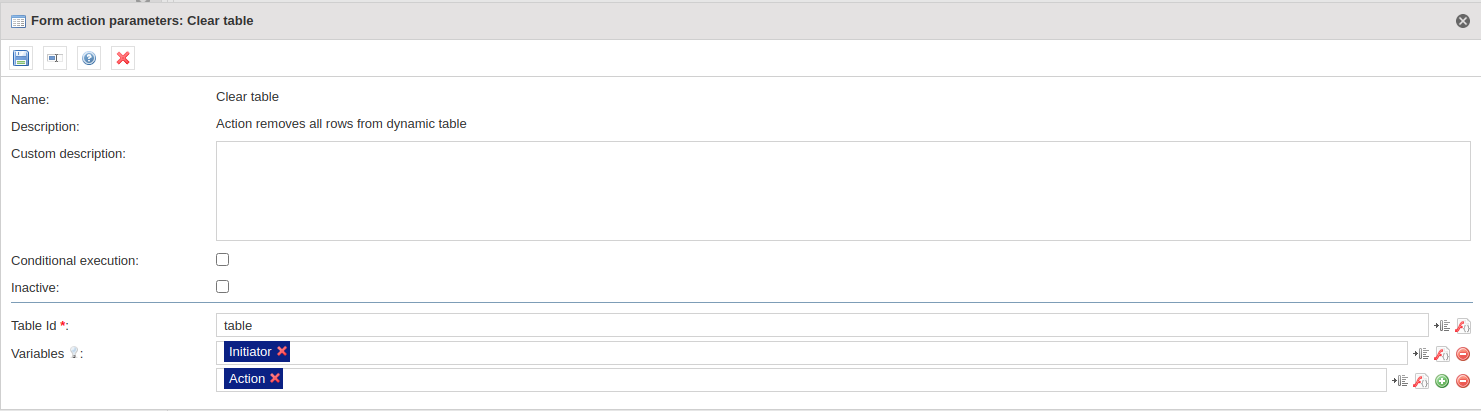 Image Added Image Added
|
| Panel |
|---|
| 1.0.2 1.0.20 - Addition of the possibility of placing the component under the button
1.0.43 1.0.84 - Adding possibility to place action on the table button, on a form and the variable.
1.0.139 - Adding possibility to place action on the acceptance button.
|
|