← Powrót do listy dostępnych setterów ← Powrót do listy dostępnych zadań automatycznych | Panel |
|---|
| title | Podstawowe informacje |
|---|
| Kategoria: Tabela Dostępna od wersji: 1.0.18 |
| Panel |
|---|
| Pozwala na ustawienie wartości w kolumnie w określonym przez warunek wierszu z możliwością odwołania się do wartości z sąsiadujących kolumn. |
| Panel |
|---|
| title | Parametry konfiguracyjne |
|---|
| | Nazwa parametru | Od wersji | Opis | Typ parametru | Wartość domyślna | Rodzaj pola | Uwagi i ograniczenia |
|---|
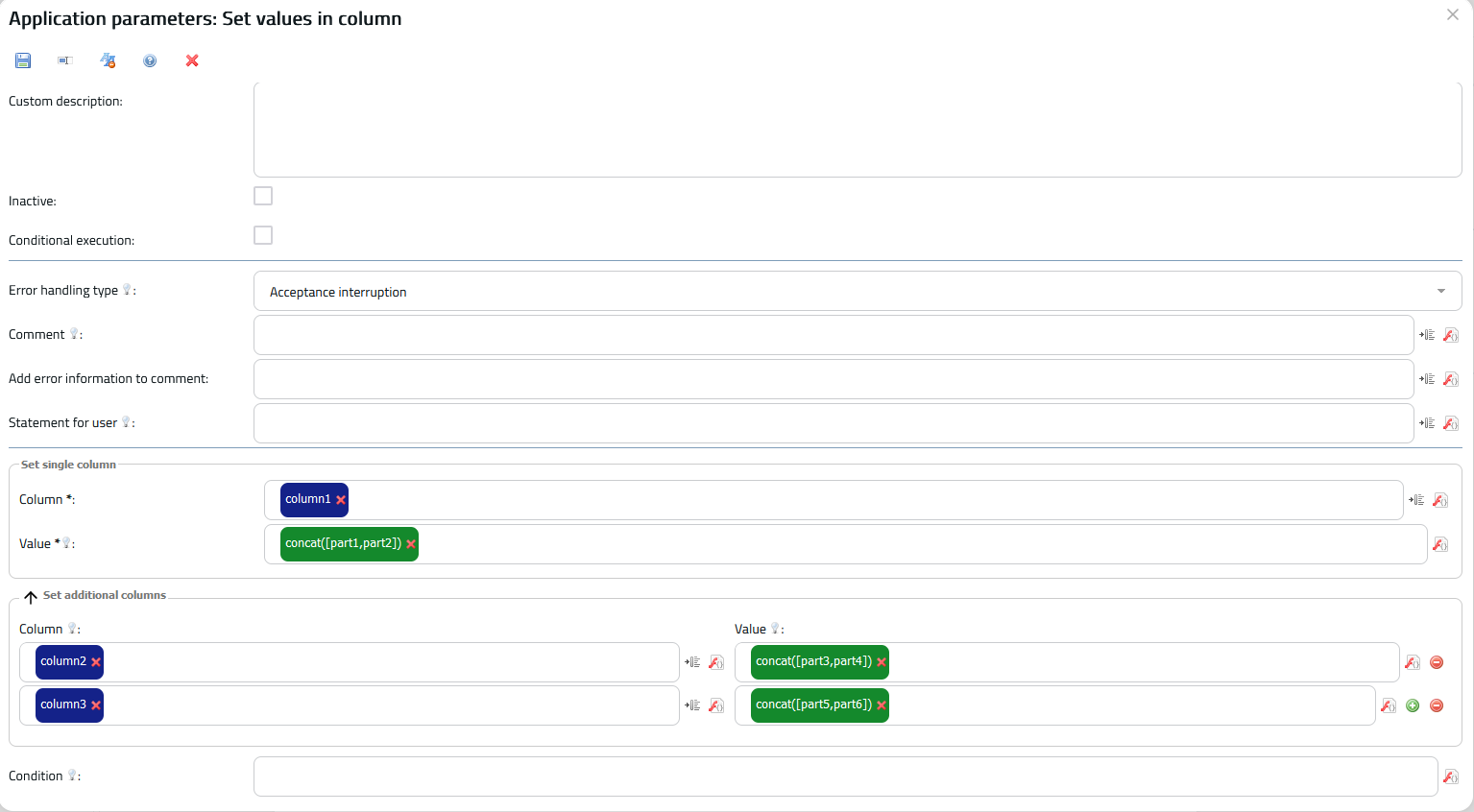
| Kolumna do ustawienia* | 1.0.18 | Kolumna w której ustawiamy wartość komórek | Zmienna | | Edytowalna lista wartości | Lista zawiera wszystkie indeksy danej klasy dokumentu | | Wartość do ustawienia w komórce* | 1.0.18 | Wartość, która zostanie ustawiona w komórce. | Funkcja | | Pole edytowalne | Można odnieść się do zmiennej kontekstowej Indeks wiersza, aby ustawić różne wartości dla poszczególnych wierszy. Funkcja musi zwracać pojedynczy odpowiednik typu, który posiada kolumna. Np. kolumna wartości tekstowych będzie ustawiana przy użyciu tekstu. | | Kolumna do ustawienia* | 1.0.18134 | Kolumna, w której ustawiamy zostanie ustawiona podana wartość komórek. | Zmienna Tablica zmiennych | | Edytowalna lista wartości | Lista zawiera wszystkie indeksy danej klasy dokumentu | Pole edytowalne | Patrz wyżej: "Kolumna do ustawienia". | | Wartość | 1.0.134 | Wartość, która zostanie ustawiona w komórce w podanej kolumnie. | Tablica funkcji | | Pole edytowalne | Patrz wyżej: "Wartość do ustawienia w komórce". | | Warunek | 1.0.18 | Wartość w danym wierszu zostanie ustawiona, jeżeli zostanie spełniony ten warunek. | Funkcja | | Pole edytowalne | Można użyć zmiennej kontekstowej Indeks wiersza, aby inaczej potraktować każdy wiersz i uzyskać możliwość porównania innych kolumn w tym wierszu. Funkcja musi zwracać wartość logiczną. Jeżeli zostawimy ten parametr pusty, to warunek będzie spełniony dla każdego wiersza. |
Parametr*- pole wymagane |
| Panel |
|---|
| | Nazwa zmiennej kontekstowej | Typ | Opis |
|---|
| Indeks wiersza | Całkowity | Przetrzymuje indeks aktualnie analizowanego przez komponent wiersza. Komponent zmienia wartość, wykonując ustawianie wiersz po wierszu z podanej kolumny. |
|
| Panel |
|---|
| title | Przykładowa konfiguracja |
|---|
| 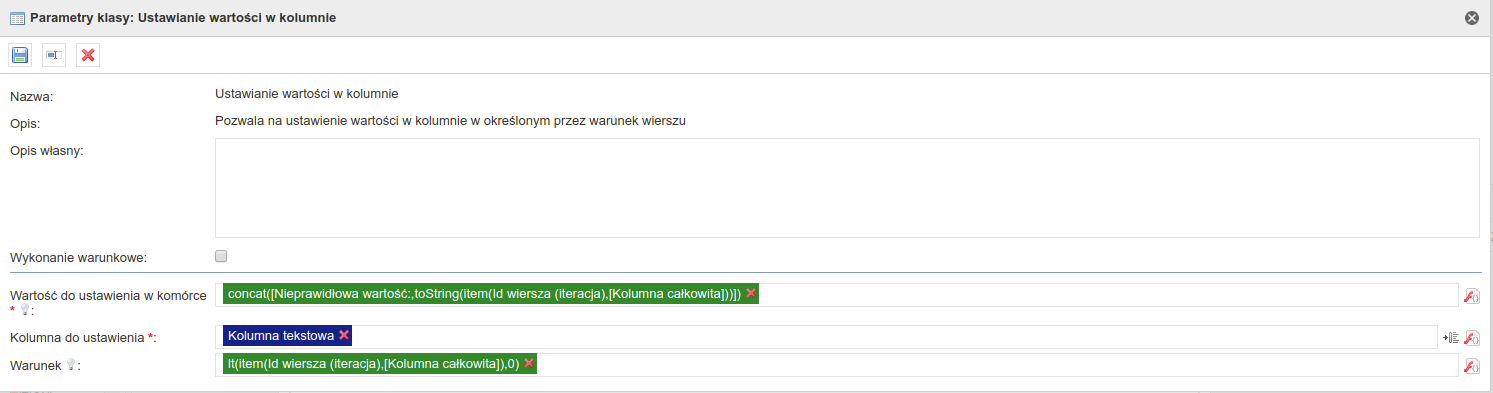 Image Removed Image Removed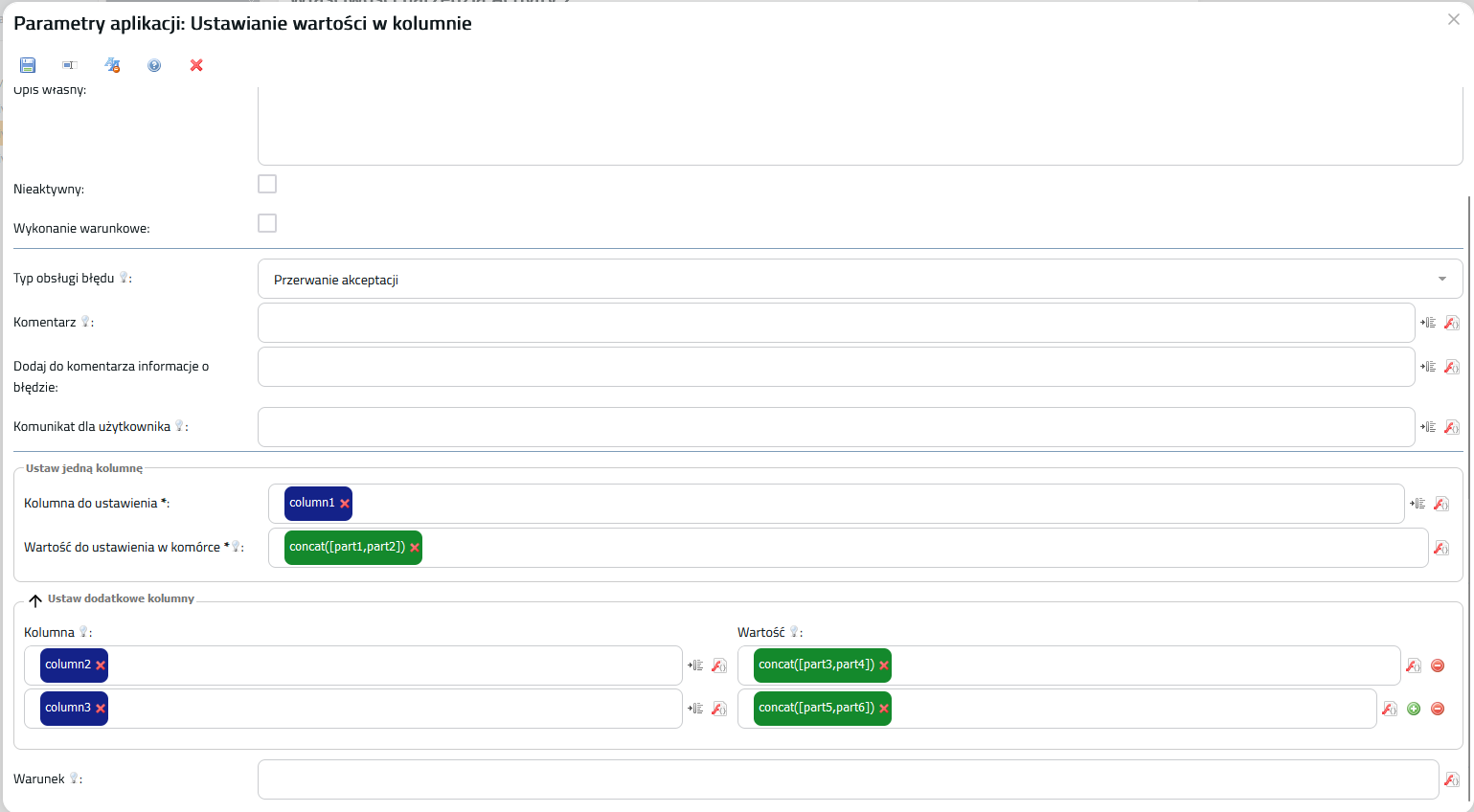 Image Added Image Added
|
| Panel |
|---|
| | 1. Ustawianie przy użyciu innej kolumny Image Removed 2. Ustawianie stałej wartości we wszystkich wierszach 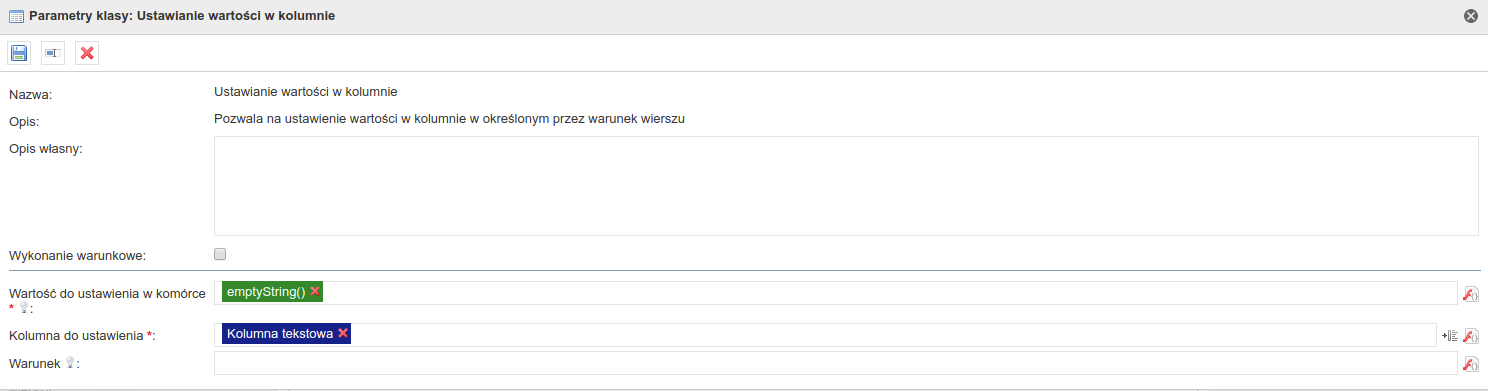 Image Removed Image Removed
| | Panel |
|---|
| 1.0.18 1.0.25 - Poprawienie rzucania wyjątków
1.0.57 - Aktualizacja dynamicznego formularza
1.0.65 - Poprawienie zwracanego błędu
1.0.66 - Naprawienie błędu po poprawce w 1.0.65 (NullPointerException)
1.0.134 - Możliwość ustawiania wartości dodatkowych kolumn
|
| Panel |
|---|
| title | Pakiet z przykładowym formularzem wykorzystującym aplikację |
|---|
| | View file |
|---|
| name | Testy komponentów - aplikacje - [APLIKACJA] Ustawianie warto ci w kolumnie 2019-10-17 13_29_06.zip |
|---|
| height | 250 |
|---|
|
|
| Hide If |
|---|
| AktualneArchwialneArchiwalne| JIRA |
|---|
| server | 192.168.1.52 JIRA |
|---|
| serverId | 2e6b42a8-62e1-3c71-bfe9-dbf183b33dc1 |
|---|
| key | CUFCMP-566 |
|---|
|
| JIRA |
|---|
| server | 192.168.1.52 JIRA |
|---|
| serverId | 2e6b42a8-62e1-3c71-bfe9-dbf183b33dc1 |
|---|
| key | CUFCMP-176 |
|---|
|
| JIRA |
|---|
| server | 192.168.1.52 JIRA |
|---|
| serverId | 2e6b42a8-62e1-3c71-bfe9-dbf183b33dc1 |
|---|
| key | CUFCMP-185 |
|---|
|
| JIRA |
|---|
| server | 192.168.1.52 JIRA |
|---|
| serverId | 2e6b42a8-62e1-3c71-bfe9-dbf183b33dc1 |
|---|
| key | CUFCMP-466 |
|---|
|
| JIRA |
|---|
| server | 192.168.1.52 JIRA |
|---|
| serverId | 2e6b42a8-62e1-3c71-bfe9-dbf183b33dc1 |
|---|
| key | CUFCMP-575 |
|---|
|
|
|