Context variables allow the creation of components built in a functional way. The creator of a component can define many arbitrary context variables, which can then be used by the user in functions defined as parameters of that component. | Info |
|---|
Context variables can only be used as arguments of a function that is a component parameter. |
An example of such a component could be a validator, which allows you to validate data in a dynamic table. A context variable $currentRow is then provided, storing the index of the current row in the table. The only parameter would be a function that would return a logical value saying whether the row is valid or not 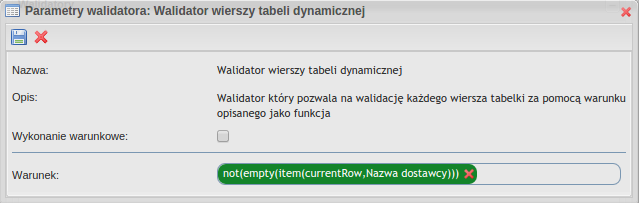 Image Added Image Added
The action configured this way will mean that the not(empty(item($currentRow, $Nazwa Dostawcy))) function will be called for each row with a changing $currentRow parameter: not(empty(item(0, $Nazwa Dostawcy)))not(empty(item(1, $Nazwa Dostawcy)))not(empty(item(2, $Nazwa Dostawcy)))
This allows us to create more versatile components. Also, we don't need to create multiple function overloads, for example, for array parameters - it's enough to use a component that allows iteration over rows of such arrays. Defining context variablesDefining context variables ( | Javadoc |
|---|
| property | javadoc.plusworkflow |
|---|
| className | com.suncode.pwfl.workflow.component.ContextVariable |
|---|
|
) is done at the stage of creating the component definition. Below is an example of adding one context variable for a validator:| Code Block |
|---|
| @Define
public void definition( ValidatorDefinitionBuilder builder )
{
builder
.id( "contextVariableExample" )
.name( "Context Variable Example" )
.category( Categories.TEST )
.contextVariable()
.id( "currentRow" )
.name( "currentRow" )
.description( "Current table row index" )
.type( Types.INTEGER )
.create()
.parameter()
.id( "fn" )
.name( "Function" )
.type( Types.FUNCTION )
.create();
} |
| Info |
|---|
Context variables will be available from the process editor for selection only as function parameters. Therefore, always when using this functionality, you should also define a parameter of type FUNCTION. |
Determine the value of context variablesThe value of context variables is set using an object | Javadoc |
|---|
| property | javadoc.plusworkflow |
|---|
| className | com.suncode.pwfl.workflow.component.ContextVariables |
|---|
|
that can be injected as a parameter of a component method. Just add a type | Javadoc |
|---|
| property | javadoc.plusworkflow |
|---|
| className | com.suncode.pwfl.workflow.component.ContextVariables |
|---|
|
parameter to the component method (e.g. validate for validator) and use the set(id, value) method: | Code Block |
|---|
| public void validate( @Param FunctionCall fn, ContextVariables contextVariables, ValidationErrors errors )
{
int length = ...; // liczba wierszy
for ( int i = 0; i < length; i++ )
    {
        contextVariables.set( "currentRow", i );
        if ( !fn.<Boolean> call() )
        {
            errors.add( "Validation errror" );
        }
    }
} |
Context variables in form actionsDue to the different environment of running form actions, the way of setting these variables is a little different. We set the value of context variables using the setContextVariable | Jsdoc |
|---|
| property | jsdoc.plusworkflow |
|---|
| className | PW.form.action.Action |
|---|
|
class:| Code Block |
|---|
| PW.FormActions.create('context-var-example', {
defaultActions: {
variableSet: function(vs, added, updated, removed) {
this.invoke(vs);
}
},
invoke: function(vs) {
var fn = this.get('fn');
var target = this.get('target');
PW.each(vs.getRecords(), function(record, index) {
this.setContextVariable("currentRow", index);
var newValue = fn.call();
target.setItemValue(newValue, index);
}, this);
}
}); |
|