| Polish |
|---|
Jeśli masz problem ze zrozumieniem jak działa setter/zadanie automatyczne, sprawdź opisy: Setter, Zadanie automatyczne, Wykonanie warunkowe, Parametry komponentów | Panel |
|---|
| title | Podstawowe informacje |
|---|
| Wtyczka: barcode-readerKategoria: Kody kreskoweDostępne od wersji: 4.0.33 |
| Panel |
|---|
| Skanuje dokumenty w poszukiwaniu kodów kreskowych i zwraca je jako listę kodów. |
| Panel |
|---|
| title | Parametry konfiguracyjne |
|---|
| | Nazwa parametru | Opis | Typ parametru | Wartość domyślna | Rodzaj pola | Uwagi i ograniczenia |
|---|
| Id pliku* | Identyfikator pliku | Tablica wartości integer | | Pole edytowalne | | | Wzorzec kodu kreskowego* | Wyrażenie regularne jakie musi zostać spełnione dla podanego kodu kreskowego. | Tablica wartości tekstowych | | Pole edytowalne | | | Typy kodów kreskowych* | Określa jakich typów kodów kreskowych ma szukać aplikacja | Tablica wartości tekstowych | | Pole edytowalne | Do wyboru lista z typami kodów kreskowych | | Wynikowe klasy dokumentów | Zmienna do której zostanie wpisana tablica z kodami kreskowymi znalezionymi w dokumentach. | Zmienna | | Pole edytowalne | Tylko zmienne tabelaryczne tekstowe. |
Parametr*- pole wymagane |
| Panel |
|---|
| title | Przykładowa konfiguracja |
|---|
| 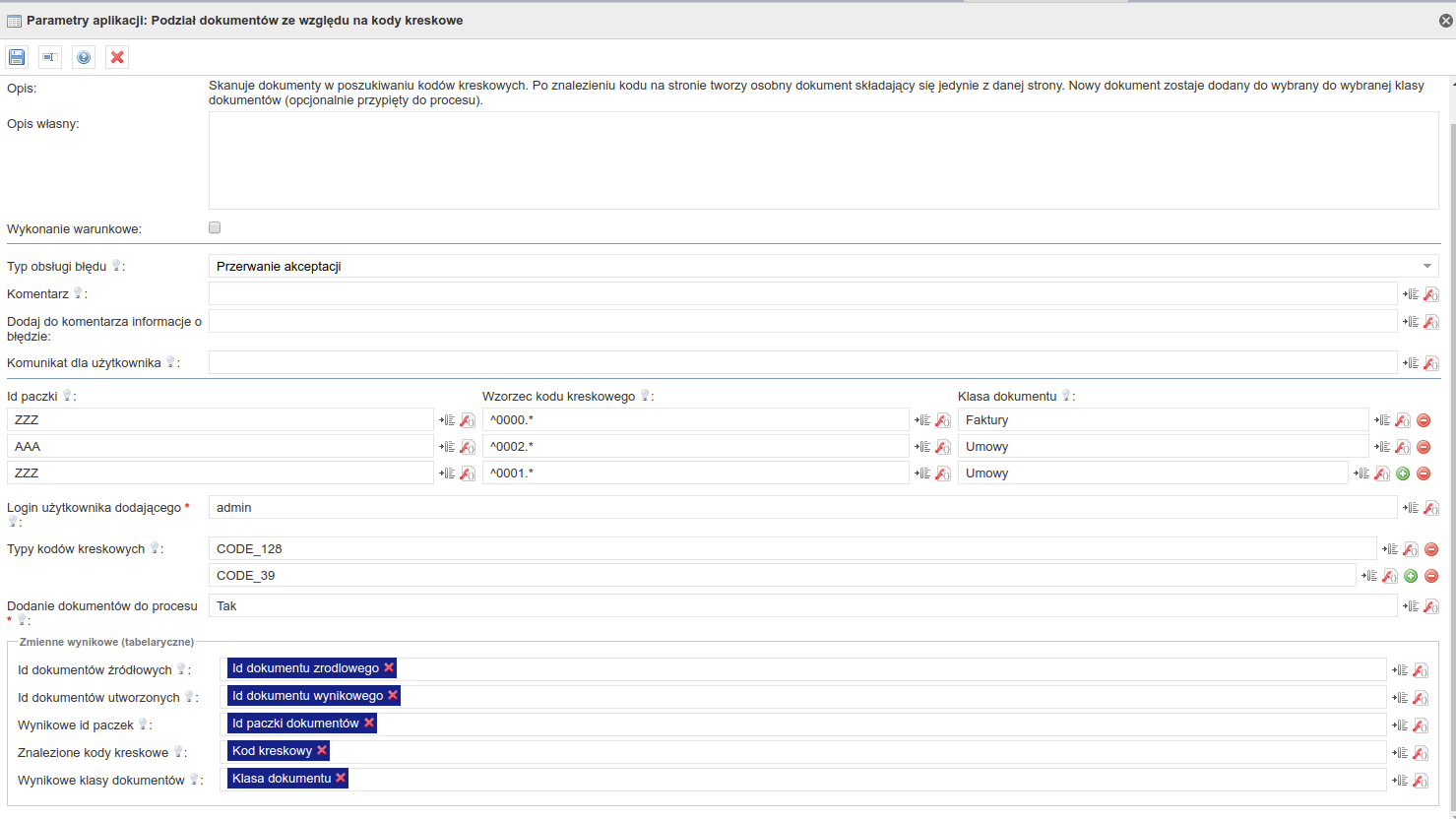 | | Panel |
|---|
|
1.0.0| Panel |
|---|
| title | Pakiet z przykładowym formularzem wykorzystującym komponent |
|---|
| | View file |
|---|
| name | Testy Barcode reader 2019-12-20 14_36_33.zip |
|---|
| height | 250 |
|---|
|
|
| Hide If |
|---|
| Powiązane zadania| JIRA |
|---|
| server | 192.168.1.52 JIRA |
|---|
| serverId | 2e6b42a8-62e1-3c71-bfe9-dbf183b33dc1 |
|---|
| key | BAR-14 |
|---|
|
|
|
| English |
|---|
← Return to the list of available setters ← Return to the list of available applications | Panel |
|---|
| Plugin: barcode-readerCategory: BarcodeAvailable from version: 1.0.0 |
| Panel |
|---|
| Scans documents for barcodes. When it finds the code on the page, it creates a new document consisting of a page with the code and subsequent pages without a barcode. In addition, if this is the first bar code found, then all pages preceding it without a bar code will also be attached to the new document. The new document is added to the selected document class (optionally pinned to the process). After the documents are created, actions on the documents are triggered: - adding a document to the archive
- adding a document to the process (if the document was pinned to the process)
The result of the application is a set of information about created documents saved to tabular variables. Information applies to: - Document id from which the new document was created
- Id of the new barcode document
- Package id from which the given bar code comes (given in the configuration parameter)
- Barcode found in the document
- Document class in which the new document has been saved.
|
| Panel |
|---|
|
| title | Configuration parameters |
|---|
|
| Name of the parameter | Description | Parameter type | Default value | Field type | Notes and restrictions |
|---|
Package id | Package id, which specifies the type of documents created | Array of text values |
Editable field |
Bar code pattern | Regular expression that must be met for the given bar code. | Array of text values |
Editable field | | Document Class | Specifies which document class will be assigned a new document created from the page with the given pattern. | Array of text values | | Drop-down list | All document classes to choose from. |
Handling of unclassified documents | Specifies how to handle documents where no bar code was found and how to handle pages found before the first bar code. The user can choose from the values:
- Skip - ignores unrecognized pages / documents
- Add as unclassified - adds document information to the result table: source document id
- Move to document class - moves to the document class and adds information about the document to the results table: source document id, created document id, resulting document class
| Text | SKIP | Drop-down list | To choose from: | Displayed Value | Value transmitted |
|---|
| Skip | SKIP | | Add as unclassified | UNCLASSIFIED | | Move to document class | MOVE |
|
| Class of unclassified documents | The class to which unclassified documents should be moved | Text | | Drop-down list | All document classes to choose from. |
| Login of the adding user | Login of user who adds new files. | Text | | Editable field | |
| Adding documents to the process | Specifies whether new documents will be added to the current process. | Boolean | No | Editable field | |
| ID of source documents | The variable into which the table with the identifiers of the source documents from which new documents were created will be entered. The number of entries corresponds to the number of newly created documents. | Variable | | Editable field | Only tabular integer variable |
| Id of documents created | The variable into which the table with the identifiers of documents created by the application will be entered. | Variable | | Editable field | Only tabular integer variable |
File ids of created documents | The variable into which the table will be entered with the identifiers of the document files created by the application. | Variable | | Editable field | Only tabular integer variable |
| Result package id | ID of the package to which the document was qualified | Variable | | Editable field | Only tabular string variable |
| Barcodes found | The variable into which the table with bar codes found in the documents will be entered. | Variable | | Editable field | Only tabular string variable |
| Resulting document classes | The variable into which the table with the document classes to which the newly created files have been allocated will be entered. | Variable | | Editable field | Only tabular string variable |
Parameter*- required field
| Panel |
|---|
| title | Sample configuration |
|---|
|
|